> For the complete documentation index, see [llms.txt](https://docs.immedio.io/llms.txt). Markdown versions of documentation pages are available by appending `.md` to page URLs; this page is available as [Markdown](https://docs.immedio.io/immedio-forms/form-detail/voice-capture.md).
# AI音声キャプチャー(α版)
フォーム配下の「AI音声キャプチャー」タブ画面の仕様
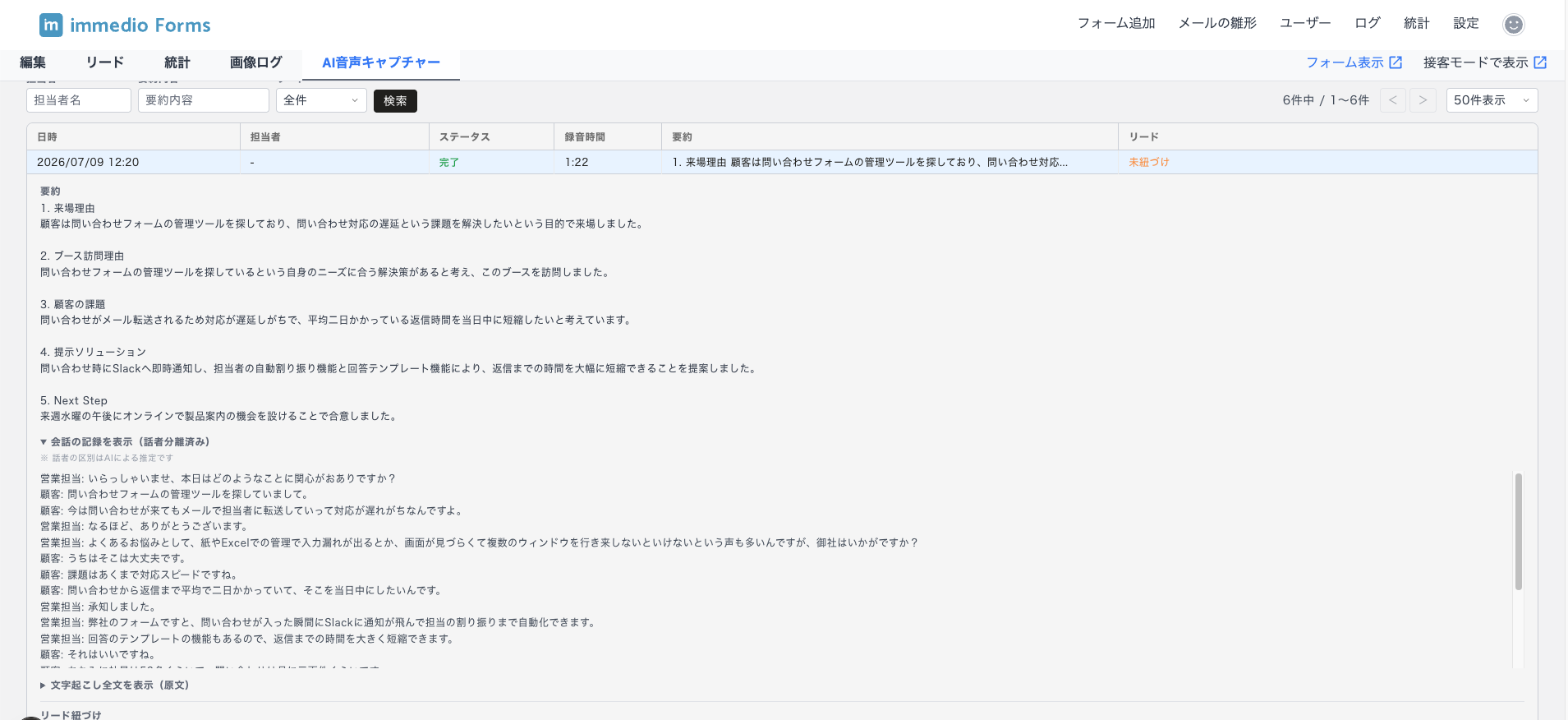
AI音声キャプチャーで録音したセッション(要約)の一覧確認と、リードへの紐づけ・解除を行う画面です。
機能全体の使い方は [AI音声キャプチャーを活用する(α版)](/immedio-forms/guides/form-distribution/ai-voice-capture.md) を参照してください。
## 一覧の表示項目
| 項目 | 説明 |
| ----- | ---------------------------------- |
| 日時 | 録音が開始された日時 |
| 担当者 | 接客モードで設定した担当者名 |
| ステータス | 録音・要約の状態(下表参照) |
| 録音時間 | 録音の長さ |
| 要約 | AIが生成した要約の先頭部分 |
| リード | 紐づいているリードの情報。未紐づけの場合は「未紐づけ」と表示されます |
### ステータスの種類
| ステータス | 説明 |
| ----- | ------------------- |
| 完了 | 要約の生成まで完了した状態 |
| 要約待機中 | 録音は完了し、要約の生成待ちの状態 |
| 要約生成中 | AIが要約を生成している状態 |
| 要約失敗 | 要約の生成に失敗した状態 |
| 録音中断 | 録音が中断され、要約に進まなかった状態 |
## フィルター・ページネーション
一覧は以下の条件でフィルターできます。
| フィルター | 説明 |
| -------- | ----------------------- |
| 担当者 | 担当者名で絞り込み |
| 要約内容 | 要約テキストで絞り込み |
| リード紐づけ状態 | 全て / 紐づけ済み / 未紐づけ で絞り込み |
表示件数は 50 / 100 / 200 件から選択できます。
## 詳細の表示
一覧の行をクリックすると詳細が展開され、要約の全文に加えて会話の記録を確認できます。
| 表示 | 説明 |
| ------------- | -------------------------------------------------------------- |
| 要約 | AIが生成した要約の全文 |
| 会話の記録(話者分離済み) | AIが発言を「営業担当」「顧客」に振り分けた形式で表示されます。話者の区別はAIによる推定のため、実際と異なる場合があります |
| 文字起こし全文(原文) | 音声認識されたテキストの原文です |
会話が短い場合など、話者分離済みの会話の記録が生成されないことがあります。その場合は原文のみが表示されます。
## リードの紐づけ・解除
詳細を開き、「リードに紐づける」ボタンからリードを選択して紐づけることができます。紐づけを解除したい場合は「紐づけ解除」ボタンをクリックします。
録音中または要約生成中にフォームを送信した場合は、リードへの紐づけは自動で行われます。詳細は [AI音声キャプチャーを活用する(α版)](/immedio-forms/guides/form-distribution/ai-voice-capture.md) の「リードへの紐づけ」を参照してください。
---
# Agent Instructions
This documentation is published with GitBook. GitBook is the documentation platform designed so that both humans and AI agents can read, navigate, and reason over technical content effectively. Learn more at gitbook.com.
## Querying This Documentation
If you need additional information that is not directly available in this page, you can query the documentation dynamically by asking a question.
Perform an HTTP GET request on the current page URL with the `ask` query parameter, and the optional `goal` query parameter:
```
GET https://docs.immedio.io/immedio-forms/form-detail/voice-capture.md?ask=&goal=
```
`ask` is the immediate question: it should be specific, self-contained, and written in natural language.
`goal` is optional and describes the broader end goal you are ultimately trying to accomplish on behalf of the user. GitBook uses it to tailor the answer towards what is most useful for that goal.
The response will contain a direct answer to the question and relevant excerpts and sources from the documentation.
Use this mechanism when the answer is not explicitly present in the current page, you need clarification or additional context, or you want to retrieve related documentation sections.