> For the complete documentation index, see [llms.txt](https://docs.immedio.io/llms.txt). Markdown versions of documentation pages are available by appending `.md` to page URLs; this page is available as [Markdown](https://docs.immedio.io/immedio-box/guides/analytics/hotlead.md).
# 直近の資料閲覧リードを一覧で確認する
リードの資料閲覧状況を一覧で確認する
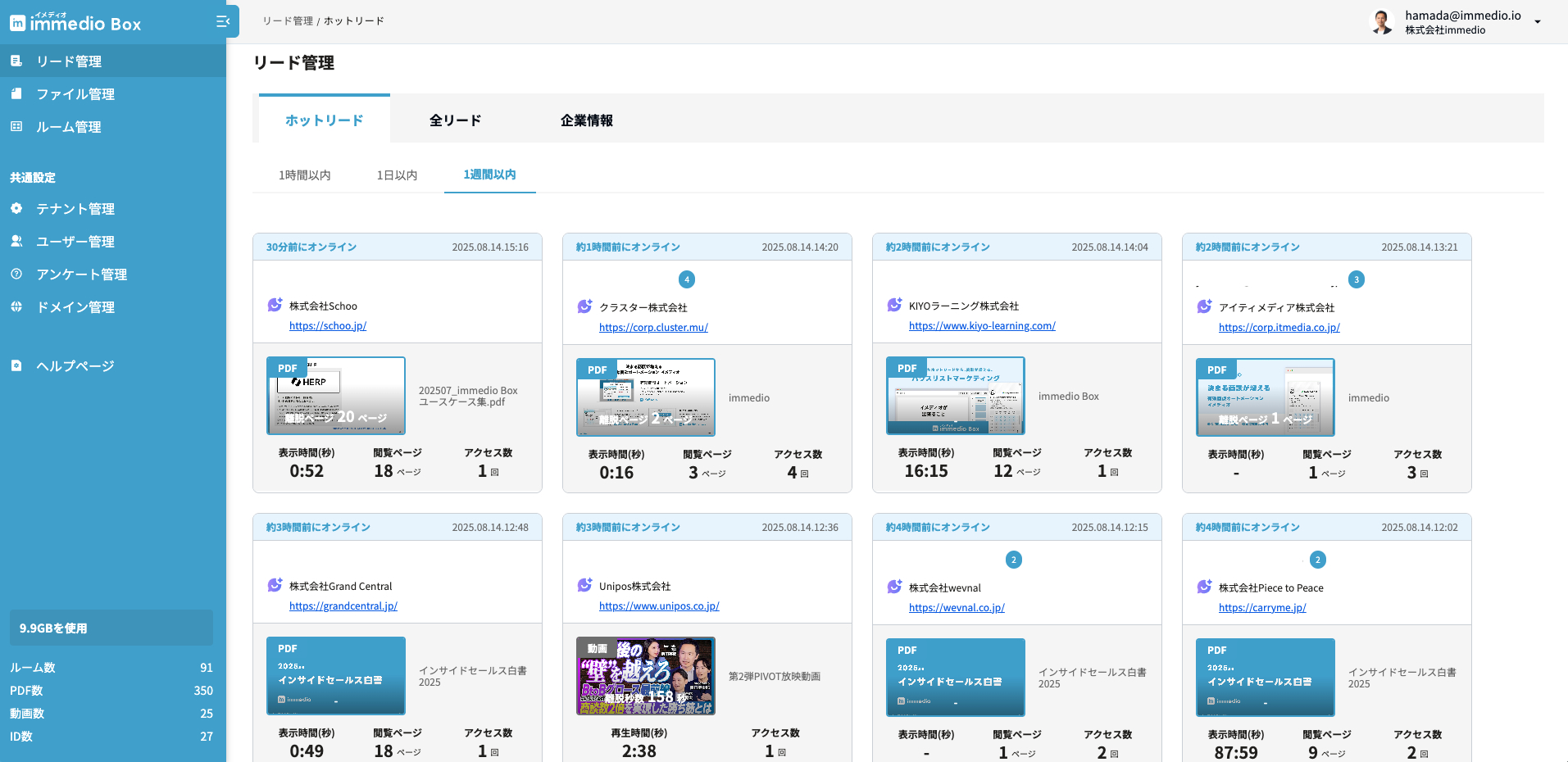
immedio Boxには、発行した資料の直近の閲覧実績を一覧することにより、いま興味を持ってくれているのが誰なのか、よく読まれている資料は何かなどを可視化出来る機能「ホットリード」があります。
この画面にアクセスするには「リード管理」をクリックしてください。
各カードには以下の情報が記載されています。
| 項目 | 備考 |
| ----------- | ----------------------------------- |
| 直近アクセス日 | 各リードの最新アクセス日です |
| リードのメールアドレス | メールアドレスの右の数字は資料を閲覧したセッションの回数を示しています |
| リードの会社情報 | ドメイン分析AIがOnになっている時に表示されます |
| 直近閲覧した資料 | 資料の種類と名称が表示されます |
| 閲覧ログ | 表示時間や閲覧ページが表示されます。 |
---
# Agent Instructions
This documentation is published with GitBook. GitBook is the documentation platform designed so that both humans and AI agents can read, navigate, and reason over technical content effectively. Learn more at gitbook.com.
## Querying This Documentation
If you need additional information that is not directly available in this page, you can query the documentation dynamically by asking a question.
Perform an HTTP GET request on the current page URL with the `ask` query parameter, and the optional `goal` query parameter:
```
GET https://docs.immedio.io/immedio-box/guides/analytics/hotlead.md?ask=&goal=
```
`ask` is the immediate question: it should be specific, self-contained, and written in natural language.
`goal` is optional and describes the broader end goal you are ultimately trying to accomplish on behalf of the user. GitBook uses it to tailor the answer towards what is most useful for that goal.
The response will contain a direct answer to the question and relevant excerpts and sources from the documentation.
Use this mechanism when the answer is not explicitly present in the current page, you need clarification or additional context, or you want to retrieve related documentation sections.