> For the complete documentation index, see [llms.txt](https://docs.immedio.io/llms.txt). Markdown versions of documentation pages are available by appending `.md` to page URLs; this page is available as [Markdown](https://docs.immedio.io/immedio-box/guides/analytics/exclude-list.md).
# 通知・集計対象外のドメイン・アドレスを設定する
自社メンバーなど、通知・集計の対象外にしたいアクセスを除外する機能です。
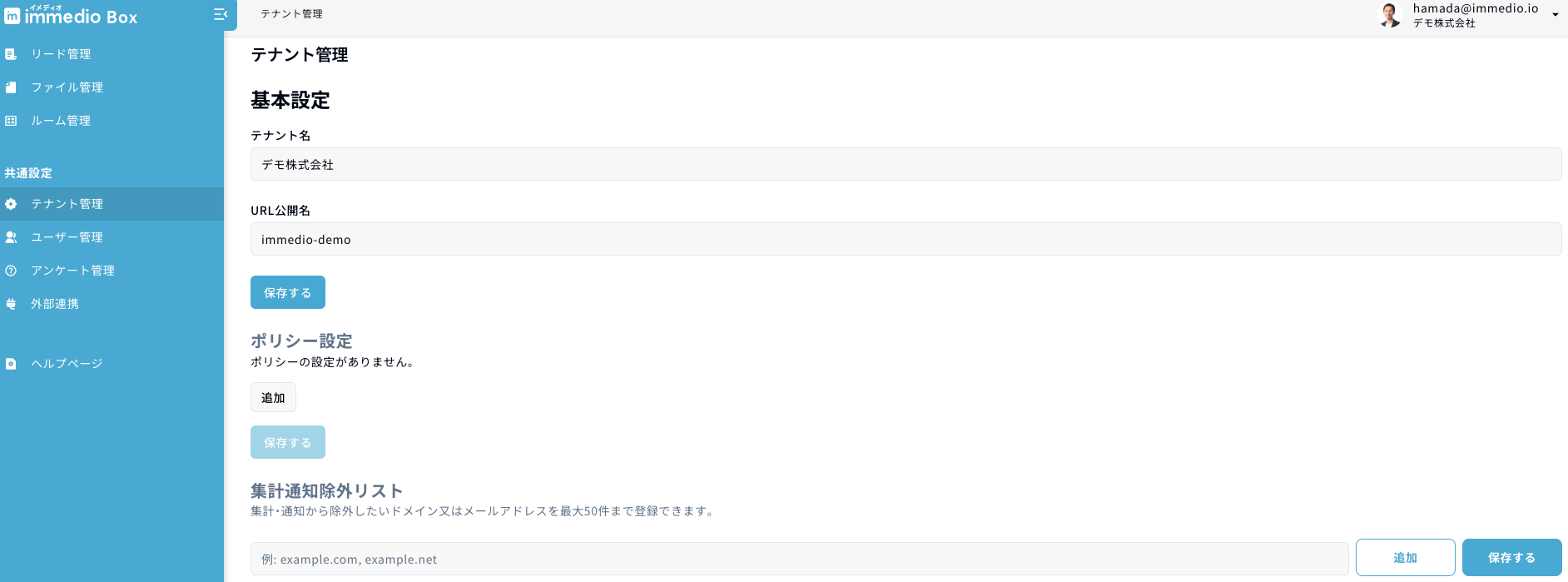
自社ドメインからのアクセスなど、通知・集計の対象外としたいものがあれば、管理画面から設定することが可能です。
設定する際は「テナント管理」の「集計通知除外リスト」にメールアドレスまたはドメインを追加して下さい。複数設定することが可能で、CSV形式(カンマ区切り)で複数を一括入力することも可能です。
この設定完了後に登録されたメアドやドメインから資料へのアクセスがあった場合、リードは作成されず通知と集計の対象外になります。
### 1. 除外の仕組み
* **メールアドレスを登録した場合**: そのメールアドレスと完全一致するアクセスが除外対象になります
* **ドメインを登録した場合**: メールアドレスの@以降がそのドメインと一致するすべてのアクセスが除外対象になります(例: `example.com` を登録すると `user@example.com` や `admin@example.com` が対象)
入力された値は自動的に小文字に変換されるため、大文字・小文字の違いは区別されません。
### 2. 除外される対象・されない対象
除外リストに該当するアクセスがあった場合、以下のように動作します。
* **除外されるもの**: リードの作成、通知(Slack・メール)の送信、閲覧状況の集計
* **除外されないもの**: 資料やルームの閲覧自体はブロックされません。閲覧者は引き続き資料を閲覧できます
閲覧自体をブロックしたい場合は、[資料ブラックリスト](/immedio-box/setup/black-list.md)をご利用ください。
※ 除外リストは設定後のアクセスに対して適用されます。設定前に作成されたリードには影響しません。
---
# Agent Instructions
This documentation is published with GitBook. GitBook is the documentation platform designed so that both humans and AI agents can read, navigate, and reason over technical content effectively. Learn more at gitbook.com.
## Querying This Documentation
If you need additional information that is not directly available in this page, you can query the documentation dynamically by asking a question.
Perform an HTTP GET request on the current page URL with the `ask` query parameter, and the optional `goal` query parameter:
```
GET https://docs.immedio.io/immedio-box/guides/analytics/exclude-list.md?ask=&goal=
```
`ask` is the immediate question: it should be specific, self-contained, and written in natural language.
`goal` is optional and describes the broader end goal you are ultimately trying to accomplish on behalf of the user. GitBook uses it to tailor the answer towards what is most useful for that goal.
The response will contain a direct answer to the question and relevant excerpts and sources from the documentation.
Use this mechanism when the answer is not explicitly present in the current page, you need clarification or additional context, or you want to retrieve related documentation sections.